ALT_IMG

Playboy USA - January/February 2012

Playboy is an American men's magazine that features photographs of nude women as well as journalism and fiction. It was founded in Chicago in 1953 by Hugh Hefner and his associates, and funded in part by a $1,000 loan from Hefner's mother. Readmore...

ALT_IMG

Returns chip poker minus

Where your poker account getting banned or even a minus your chips you feel disappointed sehinnga can no longer play texas holdem poker for that reason.Well for that I will give you a little way aga poker account you can go back to normal and you can use to return to play texas holdem poker, for it please download the tutorial below Readmore..

Alt img

Facebook Password Decryptor

FacebookPasswordDecryptor is a FREE software to instantly recover passwords stored Facebook accounts stored by popular Web browsers and messengers. Most of the storage application login password to prevent hassale of each user's password input. Readmore...

ALT_IMG

Hacking jcow webserver social

But here I will discuss is not about the use of the Jcow this as a friendship site, but the presence of a vulnerability of some version of Jcow which turned out to be compromised in just 4 steps , And even the intruder can see the contents of the victim web server directory (if it turns out the server did not implement good security). Readmore...

ALT_IMG

Through HP's Web site hacked

Basically a web browser application on the HP as well as on the PC it works the same way, which distinguish the system who work to support it own application (Java, Symbian, Linux, Windows, Android etc). Basically a web browser applications on HP or on the PC it works the same way, distinguishing the WHO system work to support it-alone application (Java, Symbian, Linux, Windows, Android, etc). Readmore...

Showing posts with label Artikel. Show all posts
Sunday, August 7, 2011

SQL Ninja Hacker Tools

0 komentar
SQL Ninja is a tool that is used for SQL Injection and the tools to megambil over the database. In essence SQL Ninja is a tool targeted to exploit the weaknesses of SQL Injection in a web application that uses Microsoft SQL Server as its back end as well as some others.
SQL Ninja main goal is to provide remote access to the database server that has a vulnerability, even in an environment that is very secure though. It could also be used by penetration testers to help and automate the process of taking over the DB Server when a SQL Injection vulnerability has been discovered .
Features available:
  • Fingerprint of the remote SQL Server (version, user performing the queries, user privileges, xp_cmdshell availability, DB authentication mode)
  • Bruteforce of 'sa' password (in 2 flavors: dictionary-based and incremental)
  • Privilege Escalation to sysadmin group if 'sa' password has been found
  • Creation of a custom xp_cmdshell if the original one has been removed
  • Upload of netcat (or any other executable) using only normal HTTP requests (no FTP / TFTP needed)
  • TCP / UDP portscan from the target SQL Server to the attacking machine, in order to find a port That is allowed by the firewall of the target network and use it for a reverse shell
  • Direct and reverse bindshell, Both TCP and UDP
  • ICMP-tunneled shell, Pls no TCP / UDP ports are available for a direct / reverse shell but the DB can ping your box
  • DNS-tunneled pseudo-shell, Pls no TCP / UDP ports are available for a direct / reverse shell, but the DB server can resolve external hostnames (check the documentation for details about how this works)
  • Evasion techniques to confuse A Few IDS / IPS / WAF
  • Integration with Metasploit3, to Obtain a graphical access to the remote DB server through a VNC server injection
  • Integration with churrasco.exe, to escalate privileges to SYSTEM on W2k3 via token kidnapping
  • Support for CVE-2010-0232, to escalate the privileges of sqlservr.exe to the SYSTEM
Requirements:
Sql Ninja uses Perl , so that what is needed is to install Perl and some of the following modules if not there by default:
* NetPacket
* Net-pcap
* Net-DNS
* Net-RawIP
* IO-Socket-SSL
* Net-pcap
You will also need a minimum Metasploit Framework 3 on your computer to use the attack mode using metasploit, and also install the VNC client if you use the VNC payload.
If something goes wrong, you should enable verbose output when the install (-v option) and / or debugging (-d) should provide some clues. SQL Ninja worked on a Gentoo system, but sqlninja have been tried to be run on the following operating systems:
  • Linux
  • FreeBSD
  • Mac OS X
Explanation please detail here: http://sqlninja.sourceforge.net/sqlninja-howto.html
Check out the video demo below:
Continue reading →

Types of Hash & Encryption

0 komentar
Lunch buddy here is my first post so please be advised if BinusHacker his writings ugly and hard to understand.
Maybe friends - friends who had the good sql injection must have difficulty in recognizing the type of hash-been discovered when doing sql injection. Hash closely related to encryption. So what does the hash itself? Hash is the result of a password or encryption of information deemed important. While Encryption is the process of securing the information by making such information can not be read without the help of specialized knowledge (http://id.wikipedia.org/wiki / Encryption).
In the first post in BinusHacker sya I will discuss the type - the type of hash, I hope this post can be useful for all of us. There are several types of hash are:
1.MD4 (Message-Digest algortihm 4)
- MD4 is made by Ronald Rivest in October 1990, MD4 is a hash function that is used prior to MD5, but because of the many shortcomings make it replaced by MD5 MD4.
- Length of 16 bytes (32 characters)
- Example: 31d6cfe0d16ae931b73c59d7e0c089c0
2. MD5 (Message-Digest algortihm 5)
- MD5 was designed by Ronald Rivest in 1991 to replace earlier hash function, MD4. In the year 1996 (http://id.wikipedia.org/wiki/MD5)
- Used in phpBB v2.x, Joomla version 1.0.13 and below are used by some of the CMS and forum
- Length is 16 bytes (32 characters)
- Example: c4ca4238a0b923820dcc509a6f75849b
3. MD5 ($ pass. $ Salt)
- Used on the WB News, Joomla version 1.0.13 and above versions
- Length of 16 bytes (32 characters)
- Hash this one starts from hashnya first then followed by saltnya
- Example: 6f04f0d75f6870858bae14ac0b6d9f73
4. MD5 ($ salt. $ Pass)
- Used in osCommerce, AEF, Gallery and several other CMS
- Length of 16 bytes (32 characters)
- Hash this one starts from saltnya first then followed by hashnya
- Example: f190ce9ac8445d249747cab7be43f7d
5. md5 (md5 ($ pass). $ salt)
- Used in vBulletin, IceBB and other cms
- Length of 16 bytes (32 characters)
- Example: 6011527690eddca23580955c216b1fd2
6. MD5 (WordPress)
- Used in wordpress
- Length is 17 bytes (34 characters)
- Hashnya initiated by the sign of $ P $ then followed by a character (the character who most often used is the letter "B") followed by saltnya (8 characters who arranged randomly, in this example saltnya is "12345678") then followed by hashnya
- Example: $ P $ B123456780BhGFYSlUqGyE6ErKErL01
7. MD5 (phpBB3)
- Used in CMS phpBB 3.xx
- Length is 17 bytes (34 characters)
- Hashnya by the $ H $ then followed by a character (the character who most often used is the number "9"), followed by saltnya (8 characters who arranged randomly, in the example I gave saltnya who is "12345678") then proceed by hashnya
- Example: $ H $ 9123456785DAERgALpsri.D9z3ht120
8. SHA-1 (Secure Hash Algorithm)
- Created by the National Institute of Standards and Technology or the U.S. Federal Information Processing Standard used by some of the CMS and some forums
- Length is 20 bytes (40 characters)
- Example: 356a192b7913b04c54574d18c28d46e6395428ab
9. SHA-256 (Secure Hash Algorithm)
- Hashnya started by a $ sign $ 5 and then followed by saltnya (8 characters who arranged randomly, in the example I gave saltnya who is "12345678") then followed by the character "$" followed by hashnya
- Length of 55 characters
- Example: $ $ 5 $ 12,345,678 jBWLgeYZbSvREnuBr5s3gp13vqi ...
10. SHA-512 (Secure Hash Algorithm)
- Hashnya started by a $ sign $ 6 and then proceed with saltnya (8 characters who arranged randomly, in the example I gave saltnya who is "12345678") then followed by the character "$" followed by hashnya
- Length of 98 characters
- Example: $ $ 6 $ 12,345,678 U6Yv5E1lWn6mEESzKen42o6rbEm ...
11. Base64
- Reply function algorithm for encoding and decoding a data into ASCII format. hashnya a maximum length of 64 characters consisting of A.. Z, a.. z and 0 .. 9, and coupled with the last two characters of the symbol + and /, and one character equals "="
- Used in some forums and CMS
- Example: Y3liZXJfY3JpbWluYWw =
Sites to crack the hash:
http://www.md5decrypter.co.uk/ => decrypt MD5
http://www.md5decrypter.co.uk/sha1-decrypt.aspx => decrypt SHA1
http://base64-encoder-online.waraxe.us/ => decode / encode base64
and much more
Sources: http://postinganane.wordpress.com

Advanced Explanation

1. SHA-1
In cryptography, SHA-1 is a cryptographic has functions designed by the National Security Agency (NSA) and published by NIST as a U.S. Federal Information Processing Standard. SHA stands for Secure Hash Algorithm. SHA algorithm is composed of three distinct and distinguished as:
  • SHA-0
  • SHA-1
  • SHA-2
HA-1 produces 160-bit digest from the message with maximum length (2 64-1) bits. SHA-1 is based on principles similar to those used by Ronald L. Rivest of MIT in the design of MD4 and MD5 message digest algorithm, but has a more conservative design.

The original specification of the algorithm was published in 1993 as the Secure Hash Standard, FIPS PUB 180 standard government agencies, by the U.S. NIST (National Institute of Standards and Technology). This version is now often referred to as SHA-0. It was withdrawn by NSA shortly after publication and has been replaced by a revised version, published in 1995 in FIPS PUB 180-1 and commonly referred to as SHA-1. SHA-1 differs from SHA-0 only by a single bitwise rotation in a schedule message that the compression function, this is done, according to NSA, to correct defects in the original algorithm which reduced its cryptographic security. However, NSA did not provide further details or identify the defects have been corrected. Weaknesses are then reported in both SHA-0 and SHA-1. SHA-1 seems to provide greater resistance to attacks, supporting the NSA's assertion that changes to increase security.
2. X.509
In cryptography, X.509 is the ITU-T standard for public key infrastructure (PKI) for single sign-on (SSO) and Privilege Management Infrastructure (PMI). X.509 determine, among other things, standard formats for public key certificates, certificate revocation lists, attribute certificates, and certification path validation algorithm.
X.509 was initially issued on July 3, 1988 and began working with the X.500 standard .. This assumes a strict hierarchical system of certificate authorities (CA) to issue certificates This contrasts with a web of trust model, such as PGP, and everyone (not just specific CA) can register and thus proving the validity of the certificate key 'others. Version 3 of X.509 includes the flexibility to support other topologies such as bridges and meshes (RFC 4158). It can be used in peer-to-peer, OpenPGP-like web of trust, but is rarely used in a way that in 2004. X.500 system has not been fully implemented, and the IETF's Public-Key Infrastructure (X.509), or PKIX, working groups have been adjusted to the standards organization that is more flexible than the Internet. In fact, the term usually refers to the X.509 certificate of the IETF's PKIX Certificate and CRL Profile X.509 v3 certificate standard, as specified in RFC 5280, commonly referred to as PKIX Public Key Infrastructure (X.509).
Certificate structure
Structure of a X.509 v3 digital certificate is as follows:
  • Certificate
  • Version
  • Serial number
  • Algorithm ID
  • Issuer
  • Validity
  • Not Before
  • Not After
  • Subject
  • Subject Public Key Info
  • Public Key Algorithms
  • Subjects Public Key
  • Issuer Unique Identifier (Optional)
  • Subject Unique Identifier (Optional)
  • Extensions (Optional)
  • Certificate Signature Algorithm
  • Signature Certificate
Issuer and subject unique identifiers introduced in version 2, Extensions in Version 3. Nevertheless, Serial number should be unique for each certificate issued by the CA (as defined in RFC 2459).
3. RSA
In cryptography, RSA (which means Rivest, Shamir and Adleman public who first described it) is an algorithm for public-key cryptography [1]. This is the first known algorithm suitable for signing and encryption, and is one of the first major advances in public key cryptography. RSA is widely used in electronic commerce protocols, and is believed to be secure given sufficiently long keys and the use of cutting-edge implementations up.
Operation
RSA algorithm involves three steps:
  • Key generation,
  • Encryption
  • Decryption.
4. Cast-128
In cryptography, CAST-128 (alternative CAST5) is a block cipher used in several products, particularly as the standard cipher in some versions of GPG and PGP. The algorithm is founded in 1996 by Carlisle Adams and Stafford Tavares using the CAST design procedure; other members of the cast of the cipher, CAST-256 (former AES candidate) is derived from the CAST-128. According to some sources, the name CAST based on the initials of its inventors, although the report author Bruce Schneier claims that "the name should conjure up images random" (Schneier, 1996).
CAST-128 is a 12 - or 16-round Feistel network with 64 - bit block size and key size between 40-128 bits (but only in a gradual 8-bit). 16 full rounds are used when the size of a key longer than 80 bits. Components includes a large 8 × 32-bit S boxes based on bent functions, depending on the rotation lock, modular addition and subtraction, and XOR operations. There are three types of alternating round functions, but they are similar in structure and differ only in the choice of the appropriate operation (addition, subtraction or XOR) at various points. Although Custody holds a patent on the design procedure CAST, CAST-128 is available worldwide on a royalty free basis for non-commercial and commercial use.
5. ElGamal Encryption
In cryptography, encryption ElGamal system is an asymmetric key encryption algorithm for public-key cryptography based on Diffie Hellman key-agreement. ElGamal encryption is used in the free software GNU Privacy Guard, the latest version of PGP, and other algorithms. The Digital Signature Algorithm is a variant of the ElGamal signature scheme, which should not be confused with ElGamal encryption. ElGamal encryption can be defined over any cyclic group G. Its security depends on the difficulty of certain problems in G associated with the computing discrete logarithm.
ElGamal encryption consists of three components:
  • Key Generator
  • Encryption algorithm,
  • Decryption algorithm.
6. MD5
In cryptography, MD5 (Message-Digest algorithm 5) is a widely used cryptographic hash function with 128 - bit hash value. Specified in RFC 1321, MD5 has been used in various types of security applications, and are also often used to check file integrity. However, it has been proven that MD5 is not collision resistant; like that, MD5 is not suitable for applications such as SSL certificates or digital signatures that depend on this property. A MD5 hash is usually expressed as a 32-digit hexadecimal number.
MD5 is one of a series of message digest algorithms designed by Professor Ronald Rivest of MIT (Rivest, 1994). When analytic work shows that MD5's predecessor MD4 was perhaps insecure, MD5 was designed in 1991 to be a safe substitute. (The downside was later found in MD4 by Hans Dobbertin.)
Security MD5 hash function is compromised. A collision attack one can find collisions in a few seconds on a normal computer (complexity of 2 24.1). [14] Furthermore, there is also an attack chosen-prefix collisions that could result in collision of two different inputs chosen arbitrarily, within hours of a single regular computer (complexity 2 39).
Algorithms
MD5 processes a variable-length messages into fixed-length output of 128 bits. Input message is broken into chunks of 512-bit blocks (sixteen 32-bit little endian integer); message padded so its length divided by 512. padding works as follows: first a single bit, 1, is appended to the end of the message. This is followed by as many zeros as are required to bring the message length of up to 64 bits fewer than a multiple of 512. Remaining bits are filled with a 64-bit integer representing the length of the original message, in bits.
The main MD5 algorithm operates on 128-bit state, divided into four-bit words 32, denoted A, B, C and D. This is to make certain fixed constants. The main algorithm then operates on each 512-bit message block in turn, each block modifying the state. Processing a message block consists of four stages of the same, called rounds, each round consisting of 16 similar operations based on non-linear function F, modular addition, and rotation to the left. Figure 1 illustrates one operation in the round. There are four possible functions F, which is used differently in each round:
RC2/40
In cryptography, RC2 is a block cipher designed by Ron Rivest in 1987. "RC" stands for "Ron's Code" or "Rivest Cipher"; other cipher designed by Rivest including RC4, RC5 and RC6.
RC2 development sponsored by Lotus, who are looking for custom password, after evaluation by NSA, can be exported as part of Lotus Notes software. The NSA suggested some changes, which included Rivest. After further negotiations, the cipher has been approved for export in 1989. Along with RC4, RC2 with 40-bit key size being treated properly under U.S. export regulations for cryptography.
Initially, the algorithm details secret - exclusively to RSA Security - but on January 29, 1996, the source code for the RC2 is anonymously posted to the Internet on a Usenet forum, sci.crypt. A similar disclosure has occurred prior to the RC4 algorithm. It is unclear whether the poster has access to the specifications or whether it has been reverse engineered.
RC2 is a 64-bit block cipher with variable key size. 18 Its rotation is set as a source-heavy Feistel network, with 16 rounds of one type (mixing) punctuated by two rounds of other types (mashed). A round consists of four applications mixing MIX transformation, as shown in the diagram.
Continue reading →
Saturday, July 23, 2011

Data Backup Web / Blog Through CPanel

0 komentar
Make my friends who have a website or blogspot domain and hosting with your own (non free) how much data is stored on a website or blog? How many times do backups? If you have never done a backup and do not know, here I was informed easy way to backup data or blog website through CPanel (Control Panel).

CPanel itself is software that is usually given when we do rent our domain hosting to install. CPanel itself is beneficial to us in managing our server hosting place (accessing the database, set up email, set up domains, etc.). Here I'll show you one of the functions for backing up data CPanel website / blog, whether it's MySQL Database and the Home Directory (directory website / blog).

To perform backups via cPanel is pretty easy, because all had been prepared so we can simply click here click there, finished. It should be noted about this backup service, not all hosting services provided by the organizers, so if there is a difference with the following information that I write this, there is also a good idea to ask the hosting provider that we use.


The first step is to login to CPanel, CPanel upon entering, we saw in the Files section, usually there are 2 icons that provide backup function, namely Backups and Backup Wizard. We try to always go to the Backups, Backups in this menu there are two main options, namely Full Backup (1) (backing up everything that comes into our server into a file, for Full Backup is provided also backups regularly (2)), and Partial Backups (backup data separately, ie between data Home Directory (3), and databases (MySQL database) (4)).


Rare second is to start the backup process, we have to prepare is our email address we put on the Email Address (1), these email addresses will be notified when the backups we're done, and we can download the backup file. After that we just do the backup process by selecting the Generate Backup (2), then we can go out (logout) from CPanel, if the backup process is completed we will receive notification via email, and we can log back into CPanel and went Backup menu, and on Full Backup page will display the file download link that contains backups that we have done previously (3).


For Partial Backups, we can just click on the link (Home Directory - (3), MySQL Database - (4)). As for the Restore can be done by uploading the backup file on a column of Home Directory Home Directory and Restore MySQL database backup files on a column of Restore a MySQL Database.

The above step is if we choose Backups, in contrast again with the Backup Wizard. Backup Wizard provides a simple step, ie we only need to select the command Backup (backup) or Restore (to restore backup data). Because we want to do a backup then we select Backup.


The next step we choose Full Backup, Home Directory, MySQL Database, and Email Forwarders & Filters. Determine the backup options that we want to do, and the next we download the backup file.


That was my friends how to backup data through CPanel, please my friends who have a website or blog by hosting his own lease for routine backup as a backup if something happens with our website or blog, then we have the data backed up and we can restore back.
Continue reading →

Trik dan Tips google Top 10

0 komentar
Below is a list of our top ten Google tricks many users don't know about.

1. Definitions - Pull up the definition of the word by typing define followed by the word you want the definition for. For example, typing: define bravura would display the definition of that word.

2. Local search - Visit Google Local enter the area you want to search and the keyword of the place you want to find. For example, typing: restaurant at the above link would display local restaurants.

3. Phone number lookup - Enter a full phone number with area code to display the name and address associated with that phone number.

4. Find weather - Type weather followed by a zip code or city and state to display current weather conditions and forecasts for upcoming days.

5. Track airline flight - Enter the airline and flight number to display the status of an airline flight and it's arrival time. For example, type: delta 123 to display this flight information if available.

6. Track packages - Enter a UPS, FedEx or USPS tracking number to get a direct link to track your packages.

7. Pages linked to you - See what other web pages are linking to your website or blog by typing link: followed by your URL. For example, typing link:http://www.computerhope.com displays all pages linking to Computer Hope.

8. Find PDF results only - Add filetype: to your search to display results that only match a certain file type. For example, if you wanted to display PDF results only type: "dell xps" filetype:pdf -- this is a great way to find online manuals.

9. Calculator - Use the Google Search engine as a calculator by typing a math problem in the search. For example, typing: 100 + 200 would display results as 300.

10. Stocks - Quickly get to a stock quote price, chart, and related links by typing the stock symbol in Google. For example, typing: msft will display the stock information
for Microsoft.

Good Luck !!!
Continue reading →

Increase Link Popularity of Article Directory

0 komentar
One powerful way to gain link popularity and increase page ranking in the eyes of search engines is to send (submit) an article to many article directories (Articles Directory) more and more of our articles on the approve (accepted) the better the popularity of our website on search engines so as to increase traffic, but that with the many articles we are "stuck" on another site to get free traffic likely we are also getting bigger.

Article directories generally have a high page ranking (PR 5 and above) in google, so with the link we are usually on the signature article stuck to the sites page rank high likelihood we will be able to "share" PR 1 or 2 levels.I recommend http://www.ezinearticles.com/, www.articlecity.com and www.articledashboard.com, I also create an article directory for you to test www.articleCillin.com.
One good tool to facilitate delivery (submit) an article to many article directories are article submitter. With this tool, article submission process becomes simpler and faster because we do not need to repeat - article re-fill the form submit, this form will be filled automatically by the article submitter, so that we do is fill in category and we can directly submit articles to article directories .
By default article submitter includes more than 100 article directories direct address can we send (submit) our article, this article directory list we can add or subtract according to our article directory that we follow, in my article submitter there are about 100 addresses can all be I submit articles within 2 hours.
Before you begin to submit an article we first have to register (sign up) to all article directories and after we registered and conform we can submit as many articles as much. My suggestion at that time was registered using the same username for all article directories and use the email address as a username when registering. 


Good luck!
Continue reading →

Menampilkan Kembali Website Mati / Halaman Web Kedaluarsa

0 komentar
Reminisce with a pet site that no longer exist on the internet? or feel once read an information on a particular site, but when trying to access the page you are referring to are not displayed anymore due to expired? To be able to show again try using the web service archive.

1.Buka http://www.archive.org/ site.

2.Pada WayBackMachine search box, type the website address you want to show off. For example enter the site URL off the ever popular in the early 2000s, namely Catcha.co.id. Click on Take Me Back.

3.Selanjutnya will appear archive site that you are looking for in columns and rows months of the year. Click a link archive to view its web page.

4.Melalui the same technique, you'll also be able to find outdated information on the web page belonging to a site that is still active.

For the record, there is a chance you will have trouble accessing archived web pages belong to certain sites. This is because the web service archive archives only the indexed sites / been indexed by the agency site Alexa (www.alexa.com), a web archive funders of this project.
Continue reading →

Protecting Computer to stick

0 komentar
Here's a message that appears if someone tries to copy / cut data from a computer
you
to be included in the flash


*. To return to normal you just change the Value Data from the key "WriteProtect" to 0


Hopefully useful!
Continue reading →

Get Money With AdSense Fast

0 komentar
The Google AdSense program is one of the most popular advertising programs on the internet. Each day more webmasters realize that they can increase their internet revenues by strategically implementing AdSense on their websites. Unfortunately most websites do not optimize their potential to make the most money with AdSense. The click through rates are so low that the income generated is almost negligible. However this can be fixed very quickly by making a few simple changes. Here are a few AdSense optimization tips that can help to increase your overall earnings:

Tip 1: Put Ads Above The Fold


The section of your website that is seen when the site first loads without having to scroll down is consider 'above the fold'. This is an important part of your site since it gets plenty of attention. It is not necessary to flood this part with ads but rather you can subtly add a horizontal or vertical link unit mixed in with the rest of the content. Maintaining a good ad to content ratio is important so never flood a site with just ads.

Tip 2: Use Well Recognized Link Colors

Blue is the standard for links on the internet. Try to make your site navigation links blue in color so that your AdSense links can blend in with the rest of your site.

Tip 3: Use the 336x280 Ad Unit

This particular ad unit has a history of good performance as far as click through rates are concerned so use it whenever you can.

Tip 4: Wrap Content Around Ad Units

If you have a decent length article then consider using an html table and wrap the content around the ads. This should help to dramatically increase click through rates.

Tip 5: Use The Maximum Allowable Ads

The AdSense program permits 3 ad units and 2 link units. If a page has enough content then be sure to use the maximum number of ads as long as your page does not develop the flea market syndrome which occurs with too much advertising and too little content. If there is an article over 800 words in length then you should be easily able to integrate the maximum allowable ads without turning off your website visitors.

Tip 6: Make The URL Color Black Or Grey

It may be best to make the url at the bottom of each ad either black or grey. This is because you want visitors to notice the headline which is created by advertisers to draw clicks so doing this places more focus on the headline of the ad.

Tip 7: Draw Relevant Ads

It is important to use AdSense in niches that are advertiser heavy otherwise you will not get relevant ads. Also make sure each page is optimized properly with proper keyword meta tags, description meta tags and keyword rich title tags. Also make the url of the page keyword rich also to increase the chances of getting the most relevant ads. Use some of these AdSense tips to increase your internet revenues.

Good Luck !!!
Continue reading →

Faster browsing with Fasterfox

0 komentar
Firefox by many regarded as the browser is quite fast. However, there are thought still not quick enough, fortunately been many efforts to accelerate the performance of an already fast firefox is. One is through plug-ins Fasterfox.

Due to the nature of the open source Firefox, many 'smart' that can contribute in developing the performance of this Fire Fox. One effort to improve performance is by tweaking firefox. That is done by plug-ins Fasterfox. Fasterfox speed up the browsing process by utilizing the links and Network Tweaking Prefect. Through Prefect Links, there is no longer idle bandwidth because firefox will capture and store web pages from the cache. The transfer process is done dilatar web pages back so as not to interfere with your browsing activities.
Network tweaking done on the settings for page rendering, simultaneous connections, pipelining, cache, DNS cache, and IPD (initial paint delay). Also in the Fasterfox also has integrated a pop-up blocker for pop-ups generated by the flash object.
To install plug-ins you can download Fasterfox http://fasterfox.mozdev.org/, After the plug-ins installed, restart Firefox to activate it. Open the menu Tools | Add-ons, and then double-click plug-ins Fasterfox to open the available options. The facility is the choice of Default, Courteous, Optimized, Turbo Charged, and Custom.
The default option will restore all settings to its original state. Options Courteous just tweaking the rendering process so it will not burden the webserver. Optimized option will do the tweaking optimum within the limits allowed by RFC. Turbo Charged option is the most extreme option, it will do tweaking as optimal as possible by ignoring the limits allowed.
Turbo Charged can be a top choice for those of you who share the Internet, is if you are a wise man, Courteous and Optimized is the right choice. By selecting a custom you can manage these aspects in greater detail tweaking. Here you can set directly the amount of cache to be used, the number of simultaneous connections to a web server, the number of pipelining, the number of pages fastback, and turn on / turn off pop-up blockers.
Enjoy!!
Continue reading →
Friday, July 22, 2011

LEARN TO MAKE A BLOG WITH WEEBLY.COM

0 komentar
Weebly is the easiest way to build your own website. But that does not mean you can not use the help to get to know your way around. All the basics you need to put together your first (and second, third, fourth - even the seventeenth) site can be found during these next few pages.Take a few minutes to read this guide, or watch the video practical, and you'll become an expert in about the time it takes to fix a good breakfast.
Let's get to it and build the site!


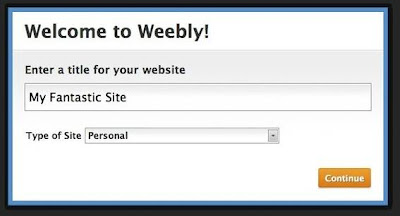
Site Title
 

Each site should have a title, which is the first thing we ask when you create a new site.This title can be easily changed later, so do not worry too much about it here. I will call this site "My Fantastic Site" for now.
Continue reading →
Thursday, July 21, 2011

Tutorial How to Apply PayPerPost

0 komentar
Business Information Online beriktu is possible a fresh breeze for fellow bloggers are fond of playing Pay To Review. Heard blum if there is an updated version of Payperpost named v4.payperpost? Well the latest version of this Payperpost us so much easier to register at v4.payperpost compared with the old version and a more enjoyable Payperpost more blogs that we are definitely in the approved daftarin. Includes Maknya v4.payperpost now.
We know you want a bolder person paper

Here is a tutorial on how to register v4.payperpost.

1. You may click here to sign up at PayPerPost. Next, please enter your e-mail address and password and click Sign up.

2. Soon will appear in the column register submit a blog to your blog.


Tutorial Cara Mendaftar  v4.payperpost

url: the url of your blog content

desription: a description of your blog

price per link: the price per link to your blog

price per word: the price per word for a paid review that we make in your blog


As a beginner, we are confused by the price to be determined. Well the solution is to simply use the facility Suggest My price, click and party v4.payperpost will advise the price for your blog.

min adv rating: select 50%

allow adult content: if you want to receive the advertiser about the adult content

Category: the category of your blog

disclosure type: select in post

preferred link type: select follow, no follow or either


3. Click Next for the next stage of Claim Blog.

Tutorial Cara Mendaftar  v4.payperpost

4. Ways to Claim Blog There are 3 ways as follows:

Create a new post inside the post which contained a sentence that is like the example above "We know you a bolder paper person".

Edit your last post and paste it into a sentence to the last post.

The final way is, create new posts of which only a sentence.


5. Once you create and publish a post like the above, we return to claim the blog on v4.payperpost. Next click on the blog and automatically Claim v4.payperpost site will keep track of your blog.


6. If the process of Claim Blog succeed, then there will be a confirmation as below. Claim successful blogs and blog you can get the job of the advertiser. That means it's time we pray and await any job offer from the advertiser. Hehehe ...


7. We can see the list of blogs that have been in the register and on-claim. If you still have another blog, please click add a blog to add to your blog.


Well it really easy. Come v4.payperpost list now, do not wait too long. Happy hunting dollars.
Continue reading →